The week is yours
Start from a common split, write your own, or take a friend's. Nothing is generated for you and nothing is recommended — the days are the ones you put there.
For people who already know what they are doing
GymBuddy does not write your programme, mark your session out of ten, or tell you that you are falling behind. You decide what the week looks like. It remembers what actually happened — and hands your week to a friend when they ask what you are running.
What it does not do
Plenty of good apps will build you a programme, score your effort and tell you when to push. This is not one of them. It assumes you have decided how you want to train, or that you are working it out — which is also yours to do, not an app's.
Start from a common split, write your own, or take a friend's. Nothing is generated for you and nothing is recommended — the days are the ones you put there.
No rating out of ten, no readiness figure, no badge. The number beside a movement is what you lifted last time, which is a fact rather than an instruction.
Say "not today" and it writes down that you did not go. A reason is optional and asked for afterwards, never on the way out the door. Nothing is broken by it.
It cannot compare you to anybody either, and not out of politeness — with nothing on a server, there is no one else's training in here to compare you against.
What leaves your phone
There is no back end to send anything to. Your training history lives in the app's own storage on your phone, and that is the whole architecture.
| Most training apps want | GymBuddy |
|---|---|
| An account and a password | None |
| Your email address | Never asked |
| A monthly subscription | Nothing to pay |
| Analytics and crash telemetry | Not collected |
| A connection to work at all | Fully offline |
| Your workout history, on their servers | On your device |
The trade is honest and the app says so out loud: with no server, the only copy that survives a lost phone is one you export yourself. Settings tells you when you last did, and turns the reminder red when it has been too long.
Today
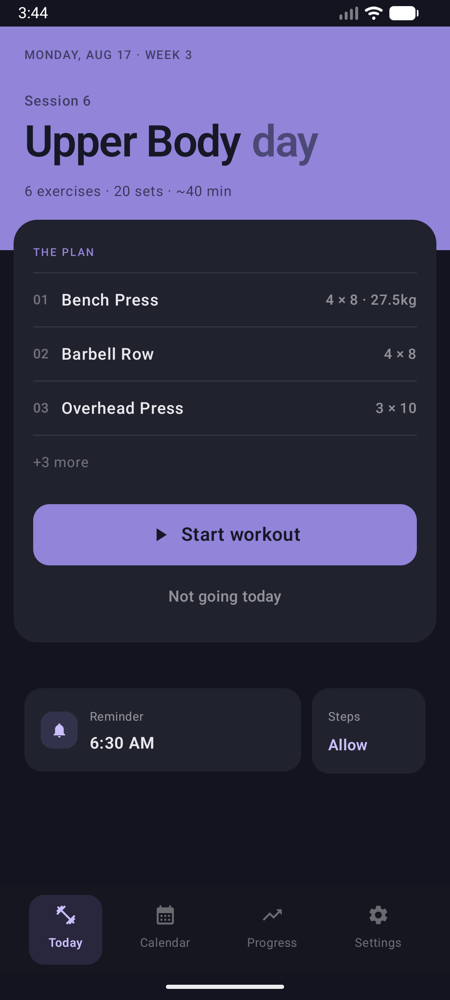
The day opens on the session that is due. Under it, a figure lit by what has gone untrained: recovering if you trained it today or yesterday, ready after two days, overdue at a week — or never, which is louder than any of them. Tap a muscle and it says when it was last worked and which session did the work.
It counts every group your split asks for and every group you have actually trained, so a squat session outside the plan is not invisible — and a group you have never trained and never planned stays out of it, rather than nagging you about a day you do not run.
The session
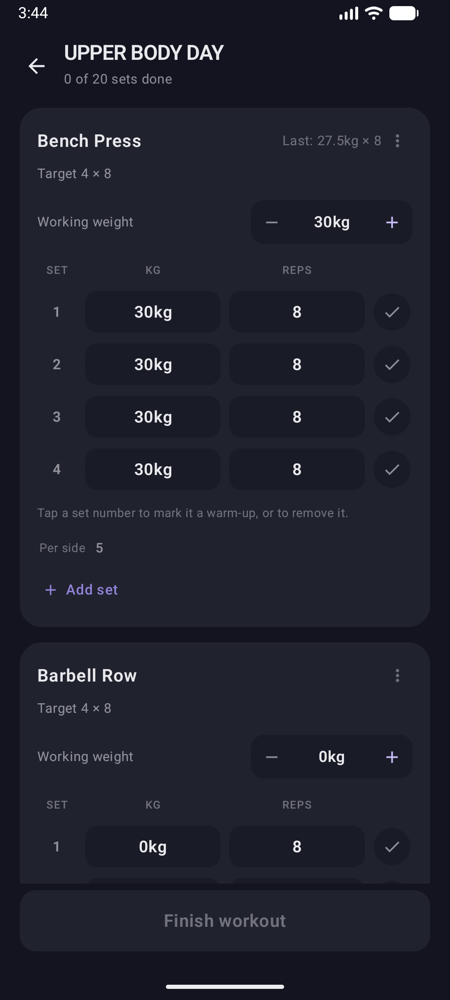
Set number, weight, reps, done. The load sits above the list because it is one decision for the exercise rather than one per set — move it and every set still ahead of you moves with it.
Each movement shows what you loaded it to last time, and nothing at all where you have never trained it. Mark a set as a warm-up and it still gets logged — it happened — but stays out of your volume, your records, and the weight suggested next time.
Last week's set sits under the set you are doing now, a warm-up ramp is one tap where a ramp makes sense, and two movements marked as a superset alternate set by set with the rest saved for the end of the round. Afterwards, how hard it felt is five words rather than a mark out of ten — Easy through All out — and you can skip it.
The week
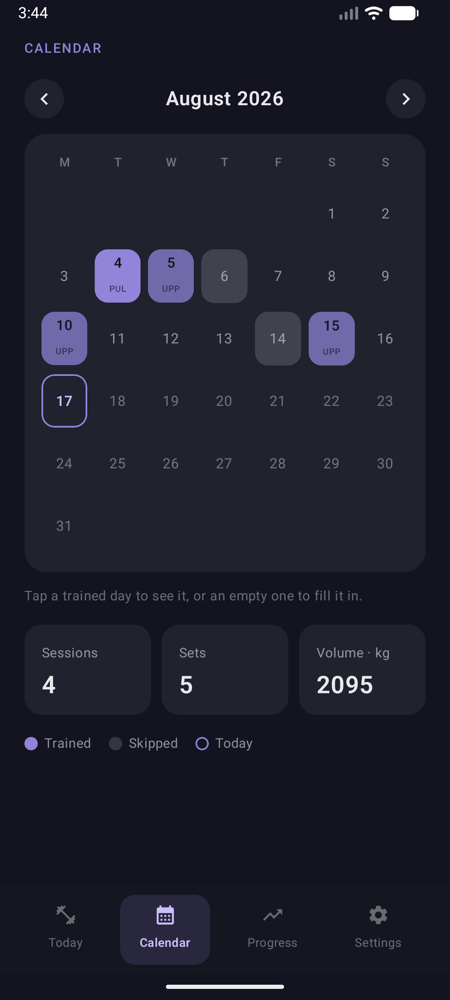
A day counts as trained because sets were logged on it, not because you remembered to check in. Each cell carries the day's name and a fill scaled against the busiest day that month, so three Pulls and no Legs is visible at a glance.
Tap a trained day to read it back. Tap an empty one in the past to fill it in — and say which day of your split it should count as, since a Tuesday you filled in later is described rather than re-planned. Say "not today" and the skip is recorded as a skip — a reason is optional, asked for afterwards, and never on the way out the door.
Under the month: this week's sets per muscle group, counted over the seven days up to today rather than since Monday, so the answer is about the week you have actually had.
Progress
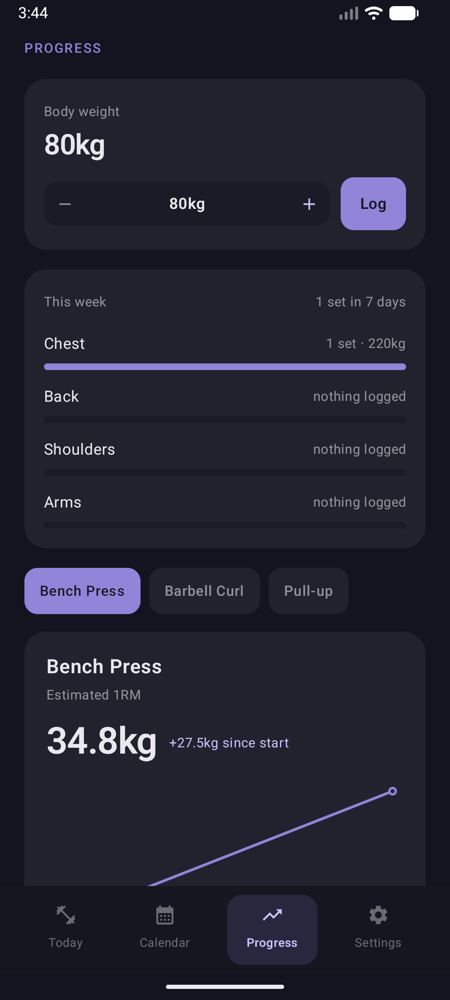
Pick a movement: an estimated one-rep max over time, the recent sessions behind it, and — for the lifts that have a published standard — where it stands against your own body weight, Beginner through Elite. That last one appears only once your weight is on file, because a bodyweight multiple with no bodyweight in it is a made-up number.
Body weight over time sits beside it, and progress photos if you want them: front, side and back, or poses you name yourself, compared against the same pose months apart rather than against a mirror.
Any of it can leave as a card — a session, a streak, a month, a year, or what one lift has done since you started — drawn here and sent by you, carrying nothing you did not log.
Splits
Start from Push/Pull/Legs, Upper/Lower or Full Body — or from nothing — then name it, add days, and set what each weekday trains. A built-in is copied rather than adopted, so from the moment you take it, you are editing yours and nobody else's idea of it.
Moving to another saved split loses nothing — the one you leave is kept exactly as it stands, which is what makes trying a different week worth doing.
The answer is a link in a message, not an invitation to sign up for something. It opens on a preview of what the week trains and which movements are new to them — and lands beside the split they are on, never on top of it.
Eight muscle groups, including the conditioning people log beside their lifting. Type a name nothing matches and the picker offers to create it.
Writing one
A week is plain text — a line per day, Push: Bench Press 4x6, Dips 3x10 —
so you can write one in a message to yourself. Paste it into the app and it reads it as
you type, telling you what it found before anything is saved.
If you would rather not start from a blank page, the import screen hands you a prompt with your training days already filled in. Give it to ChatGPT, Claude or anything similar, say what you are after, and paste the answer back. That is still not the app telling you how to train — it is you asking somebody else, which has always been allowed.
Details that took the longest
A nudge at the time you set, not somewhere in the hour after it. One tap on the notification says "not today" and the skip is recorded without opening the app.
Today's session at a glance — and if the phone has sat untouched overnight, it says it is out of date rather than confidently showing you yesterday.
Every set as a CSV, one row each, that opens anywhere and still means something on the day this app stops being installed.
GymBuddy runs on Android and iOS, and gets used every training day on the phone of the person who wrote it. There is no App Store or Play listing to link to yet, and this page is not going to pretend otherwise while it waits for one.
Until there is, the same app runs in a browser tab. Nothing to install and nothing to sign up for: what you log is kept by that browser, on that device, and goes nowhere else. A tab cannot do everything a phone can — no reminders, no step count, no widget — and Support says exactly what is missing.